
引言
大型语言模型(LLMs)在解决实际问题时,选择正确的方法至关重要。从宏观上看,主要有两种模式可供选择:检索增强生成(Retrieval-Augmented Generation, RAG) 和 模型上下文协议(Model Context Protocol, MCP)。RAG 的核心是将 LLM 的回答与现有的文档、知识库或手册相结合,确保其回答有事实依据。而 MCP 则旨在为模型提供通过工具、API 和工作流检索实时数据或执行操作的能力。
如果你的目标是从结构化知识中获得可追溯的答案,那么 RAG 是理想之选。如果你的应用需要最新的数据或系统交互,MCP 则是逻辑上的延伸。然而,现实世界的应用往往是混合模式,即 RAG 与 MCP 的结合使用:RAG 提供上下文和论证,MCP 执行操作,然后再次使用 RAG 将解释反馈给用户。
本指南将深入探讨如何根据不同场景选择这两种方法,识别潜在的陷阱,并展示 RAG → MCP → RAG 这种混合工作流如何成为生产级 AI 系统的基石。
核心要点
- 两种互补模式: 与 LLM 交互通常分为两种通用模式:检索知识(RAG)或利用工具执行动作(MCP)。
- RAG 擅长查询任务: RAG 适用于静态或半静态知识库,其中答案需要溯源、引用和明确的事实可追溯性。
- MCP 驱动实时操作: 当任务涉及 API、数据库或需要实时数据和状态变更的工作流时,MCP 更为适用。
- 两者均有潜在风险: RAG 面临内容过时、分块不匹配或提示上下文超载等挑战。MCP 的风险在于工具定义不清、工具调用陷入循环的风险,或工具可能产生不安全副作用。
- 许多生产场景会融合 RAG 和 MCP——首先通过 RAG 检索知识,然后使用 MCP 执行操作,最后再回到 RAG 进行解释和论证。
前置知识
- 熟悉 LLM: 理解大型语言模型是什么以及它们如何处理输入/输出。
- 熟悉 API 和数据库: 理解 API、工具调用、结构化数据源等的作用。
- 了解检索概念: 对搜索、索引、嵌入(embeddings)、TF-IDF 等概念有基本了解,将有助于理解 RAG 相关章节。
- 具备编程能力(Python): 示例代码(数据类、工具注册表、检索器等)使用 Python 编写,能够理解脚本会很有帮助。
- 具备系统思维: 在构建真实世界的 AI 应用时,需要考虑权衡、故障模式和混合工作流。
理解 RAG 与 MCP(快速定义)
在深入探讨如何选择 RAG 或 MCP 之前,我们先快速澄清这两个术语的含义。
- 检索增强生成(Retrieval-Augmented Generation, RAG): 这种方法涉及将 LLM 与检索步骤(例如搜索或向量数据库)结合使用。你首先对内容进行索引(将文档分割成块,获取嵌入并存储在索引中)。当接收到查询时,系统会从索引中检索最相关的块,并将其作为附加信息提供给 LLM。模型随后根据这些检索到的信息生成答案。
- 模型上下文协议(Model Context Protocol, MCP): 这是一种正式的契约设计,用于将外部数据源和工具集成到模型中。基于 MCP 的设置通常会注册一系列工具(函数、API、数据库查询等),并提供它们的接口(名称和输入/输出的 JSON schema)。当模型面临任务时,它可以选择通过输出结构化的调用(例如,填充参数的 JSON)来调用其中一个工具。宿主环境会监控这些调用,触发相关的函数/API 调用,并将结果返回给模型。
RAG 适用场景
通常情况下,在信息已文档化或相对静态的任何场景中,RAG 都应是你的首选解决方案。以下情况应考虑使用 RAG:
- 答案存在于静态或半静态知识库中: 例如,政策文档、产品规格、操作手册、学术论文等。
- 需要可追溯的、基于事实的答案: 使用 RAG,模型可以引用来源,或明确指出信息来自哪个文档和章节。
- 对超低延迟没有严格要求(在合理范围内): 如果你的领域可以接受一定的延迟,并且不需要为每个查询实时调用外部 API,RAG 是一个很好的选择。
MCP 适用场景
当静态文档不足以满足需求时,MCP 便能大显身手。如果出现以下情况,你应选择 MCP(工具使用)方法:
- 需要包含文档中不包含的最新或动态数据: 当你需要的数据存在于 API 或数据库背后,并且可能随时间变化时(例如产品库存水平、天气、用户账户信息等),模型可以使用工具来访问这些最新数据。
- 希望模型执行操作而不仅仅是提供答案: 操作可以是“为这个问题创建一张支持工单”、“向新用户发送一封欢迎邮件”或“订购 50 份产品 X”。
- 执行复杂的、多步骤工作流: 借助 MCP,模型可以规划和执行一系列工具调用。例如,利用一个 API 调用获取的数据作为决策依据,来调用另一个 API。
潜在的故障模式
RAG 和 MCP 都存在潜在的故障模式。提前了解这些问题可以帮助你构建更健壮的系统。以下是一些常见的故障模式:
RAG 故障模式:
- 内容过时/缺失: 如果你的文档语料库过时或不包含所需答案,RAG 检索将无法凭空生成信息。
- 分块或召回问题: RAG 系统通常将文档分割成较小的块进行索引。如果相关事实分散在多个块中,或者查询使用的词语/同义词与存储文本不匹配,检索器可能无法选择正确的段落。
- 上下文超载: 在提示中包含过多检索到的块(例如,超出模型的上下文窗口大小或包含过多不相关文本)会损害模型性能。
MCP 故障模式:
- 工具定义不佳: 如果提供给模型的工具名称不清晰、描述不准确,或者输入/输出的 schema 规范不完善,模型可能无法正确使用它们。
- 规划循环或工具误用: 当模型不确定如何解决问题时(尤其是在工具调用未能提供必要答案且没有防止进一步尝试的防护措施时),一个不受约束的模型可能会进入无限循环或不断重复调用工具。
- 安全与副作用: 允许模型执行操作也需要考虑潜在的副作用。例如,如果工具在未经授权的情况下被调用,可能会被滥用(例如,一个读取任意信息的工具可能被误用来读取私人或受限信息)。
认识这些故障模式将有助于制定相应的防护措施。例如,你需要为 RAG 建立高质量的知识库并采用优秀的检索策略;为 MCP 提供明确的工具 schema 和使用策略,并为操作设置防护措施。
RAG 与 MCP 选择速查规则
以下是一些简单的指导原则,可用于确定在给定查询或功能下应首先采用哪种方法:
- 如果问题可以通过简单阅读现有文本来回答,请使用 RAG。问自己:“系统可访问的某个地方是否已经记录了这些信息?”如果是,那很可能是一个检索问题。
- 如果任务是对实时数据进行查询或执行操作,请使用 MCP(工具)。如果人类会通过在数据库中查找内容或点击系统中的按钮来解决请求,那么这强烈暗示助手应该使用工具。
- 如果用户请求同时需要知识和操作,请考虑采用混合方法。一些实际问题将同时需要两者。首先,需要检索一些知识,例如策略或规则;然后,将采取行动;最后,必须解释该行动的结果。RAG → MCP → RAG 模式是一种非常常见的实践。
RAG 与 MCP 示例:书店运营助手
这个示例演示了两种模式来回答用户关于书店运营的问题。RAG 模式下,答案从静态的“手册”政策中检索;而 MCP 式工具模式下,答案通过调用实时函数来获取库存状态或执行操作。在此代码中,RAG 通过一个小型 TF-IDF 检索器实现,用于处理一些静态政策文本。“MCP 式”工具则由简单的 Python 函数模拟(注意:这里没有实际使用 LLM)。
设置与导入
"""
Run locally:
  python -m pip install --upgrade pip
  pip install gradio scikit-learn numpy pandas
  python RAG_vs_MCP_Demo_App.py


"""
from __future__ import annotations

import re
import json
from dataclasses import dataclass, asdict
from typing import Any, Callable, Dict, List, Tuple, Optional

import numpy as np
import pandas as pd
from sklearn.feature_extraction.text import TfidfVectorizer
from sklearn.metrics.pairwise import cosine_similarity
import gradio as gr
静态手册检索(RAG)
RAG 组件将政策“手册”视为一个小型知识库。代码将 4 份政策文档(退货、运输、会员、礼品卡)保存到 DOCS 中。它使用 TfidfVectorizer(stop_words="english") 对这些文本进行拟合,创建了一个词频-逆文档频率(TF-IDF)矩阵。
TF-IDF 是一种数值统计方法,它根据一个词语在语料库中对某个文档的重要性来加权。用户的查询使用相同的 TF-IDF 模型进行向量化,然后计算查询向量和文档向量之间的余弦相似度。
# ------------------------------
# 1) Tiny knowledge base (handbook) for RAG
# ------------------------------
DOCS = [
    {
        "id": "policy_returns",
        "title": "Returns & Refunds Policy",
        "text": (
            "Customers can return most new, unopened items within 30 days of delivery for a full refund. "
            "Items must be in their original condition with receipt. Refunds are processed to the original payment method. "
            "Defective or damaged items are eligible for free return shipping."
        ),
    },
    {
        "id": "policy_shipping",
        "title": "Shipping Policy",
        "text": (
            "Standard shipping typically takes 3 to 5 business days. Expedited shipping options are available at checkout. "
            "International orders may take 7 to 14 business days depending on destination and customs."
        ),
    },
    {
        "id": "policy_membership",
        "title": "Membership Benefits",
        "text": (
            "Members earn 2 points per dollar spent, get early access to new releases, and receive a monthly newsletter with curated picks. "
            "Points can be redeemed for discounts at checkout."
        ),
    },
    {
        "id": "policy_giftcards",
        "title": "Gift Cards",
        "text": (
            "Gift cards are available in denominations from $10 to $200 and are redeemable online or in-store. "
            "They do not expire and cannot be redeemed for cash except where required by law."
        ),
    },
]

# Fit a very small TF‑IDF retriever at startup
VECTORIZER = TfidfVectorizer(stop_words="english")
KB_TEXTS = [d["text"] for d in DOCS]
KB_MATRIX = VECTORIZER.fit_transform(KB_TEXTS)


def rag_retrieve(query: str, k: int = 3) -> List[Dict[str, Any]]:
    """Return top-k documents as {id,title,text,score}."""
    if not query.strip():
        return []
    q_vec = VECTORIZER.transform([query])
    sims = cosine_similarity(q_vec, KB_MATRIX)[0]
    idxs = np.argsort(-sims)[:k]
    results = []
    for i in idxs:
        results.append({
            "id": DOCS[i]["id"],
            "title": DOCS[i]["title"],
            "text": DOCS[i]["text"],
            "score": float(sims[i]),
        })
    return results


def rag_answer(query: str, k: int = 3) -> Tuple[str, List[Dict[str, Any]]]:
    """Simple, template-y answer based on top-k docs."""
    hits = rag_retrieve(query, k=k)
    if not hits:
        return ("I couldn't find anything relevant in the handbook.", [])

    # Compose a short grounded answer using snippets
    bullets = []
    for h in hits:
        # Take the first sentence as a snippet
        first_sentence = h["text"].split(".")[0].strip()
        if first_sentence:
            bullets.append(f"- **{h['title']}**: {first_sentence}.")
    answer = (
        "**Handbook says:**\n" + "\n".join(bullets) +
        "\n\n(Answer generated from retrieved policy snippets; no LLM used.)"
    )
    return answer, hits
RAG 检索的工作原理如下:
- 索引政策文本: 将手册的每个段落转换为 TF-IDF 向量。
- 嵌入查询: 使用相同的向量化器将用户的查询向量化为 TF-IDF 向量。
- 计算相似度: 计算每个政策文档与查询之间的余弦相似度得分。
- 检索前 K 个文档: 选择相似度得分最高的前 k 个文档作为相关结果。
这只是一个简单的替代方案,更完整的 RAG 管道会使用神经网络嵌入(neural embeddings)。在识别出最相关的政策文档后,rag_answer() 函数用于生成简短答案。对于每个匹配项,它会提取政策文本的第一句话,并以项目符号形式(包含政策标题)进行格式化。
MCP 式工具(实时库存)
演示代码中的“MCP”部分展示了助手如何调用函数来操作实时库存数据。
# ------------------------------
# 2) MCP-style tool registry + client executor
# ------------------------------
@dataclass
class ToolParam:
    name: str
    type: str  # e.g., "string", "number", "integer"
    description: str
    required: bool = True


@dataclass
class ToolSpec:
    name: str
    description: str
    params: List[ToolParam]


@dataclass
class ToolCall:
    tool_name: str
    args: Dict[str, Any]


@dataclass
class ToolResult:
    tool_name: str
    args: Dict[str, Any]
    result: Any
    ok: bool
    error: Optional[str] = None


# In-memory "live" inventory
INVENTORY: Dict[str, Dict[str, Any]] = {
    "Dune": {"stock": 7, "price": 19.99},
    "Clean Code": {"stock": 2, "price": 25.99},
    "The Pragmatic Programmer": {"stock": 5, "price": 31.50},
    "Deep Learning": {"stock": 1, "price": 64.00},
}


# Define actual tool functions
def tool_get_inventory(title: str) -> Dict[str, Any]:
    rec = INVENTORY.get(title)
    if not rec:
        return {"title": title, "found": False, "message": f"'{title}' not in inventory."}
    return {"title": title, "found": True, **rec}


def tool_set_price(title: str, new_price: float) -> Dict[str, Any]:
    rec = INVENTORY.get(title)
    if not rec:
        return {"title": title, "updated": False, "message": f"'{title}' not in inventory."}
    rec["price"] = float(new_price)
    return {"title": title, "updated": True, **rec}


def tool_place_order(title: str, quantity: int) -> Dict[str, Any]:
    rec = INVENTORY.get(title)
    if not rec:
        return {"title": title, "ordered": False, "message": f"'{title}' not in inventory."}
    if quantity <= 0:
        return {"title": title, "ordered": False, "message": "Quantity must be positive."}
    rec["stock"] += int(quantity)
    return {"title": title, "ordered": True, "added": int(quantity), **rec}


# Registry of specs (like MCP manifests)
TOOL_SPECS: Dict[str, ToolSpec] = {
    "get_inventory": ToolSpec(
        name="get_inventory",
        description="Get stock and price for a given book title.",
        params=[
            ToolParam("title", "string", "Exact book title"),
        ],
    ),
    "set_price": ToolSpec(
        name="set_price",
        description="Update the price for a book title.",
        params=[
            ToolParam("title", "string", "Exact book title"),
            ToolParam("new_price", "number", "New price in dollars"),
        ],
    ),
    "place_order": ToolSpec(
        name="place_order",
        description="Increase stock by ordering more copies.",
        params=[
            ToolParam("title", "string", "Exact book title"),
            ToolParam("quantity", "integer", "How many copies to add"),
        ],
    ),
}

# Mapping tool names to callables
TOOL_IMPLS: Dict[str, Callable[..., Any]] = {
    "get_inventory": tool_get_inventory,
    "set_price": tool_set_price,
    "place_order": tool_place_order,
}


def validate_and_call(call: ToolCall) -> ToolResult:
    spec = TOOL_SPECS.get(call.tool_name)
    if not spec:
        return ToolResult(tool_name=call.tool_name, args=call.args, result=None, ok=False, error="Unknown tool")

    # minimal validation
    for p in spec.params:
        if p.required and p.name not in call.args:
            return ToolResult(tool_name=call.tool_name, args=call.args, result=None, ok=False, error=f"Missing param: {p.name}")

    try:
        fn = TOOL_IMPLS[call.tool_name]
        result = fn(**call.args)
        return ToolResult(tool_name=call.tool_name, args=call.args, result=result, ok=True)
    except Exception as e:
        return ToolResult(tool_name=call.tool_name, args=call.args, result=None, ok=False, error=str(e))
代码本身定义了一个内存中的图书列表,每本书都有相关的库存数量和价格。它还定义了 3 个用于检查/更新库存的工具函数:
get_inventory(title: str):根据书名查找图书,返回其库存和价格,或未找到消息。set_price(title: str, new_price: float):将图书价格更新为给定值。place_order(title: str, quantity: int):通过增加给定数量来提高图书库存(模拟订购更多副本)。
这些工具都注册在一个简单的内存工具注册表中。每个工具的 ToolSpec 包含其名称、描述和参数 schema(名称、类型、描述)。这类似于 MCP 或函数调用框架定义工具时使用结构化输入 schema 的方式。真实的 LLM API 也会以类似方式公开这些工具及其标题和价格参数的 JSON schema。
MCP“标准化了工具的定义、托管和向 LLM 暴露的方式”,使模型能够轻松发现和使用工具。我们的 Python 代码利用简单的数据类(ToolParam、ToolSpec 等)来捕获这些 schema。
validate_and_call() 函数接受一个建议的 ToolCall(工具名称 + 参数),并调用它所代表的 Python 函数,返回一个 ToolResult(输出或错误)。这类似于后端接收模型函数调用请求并在已部署的 LLM 系统中运行该 API 调用。
查询路由:RAG vs 工具 vs 两者兼有
该应用可以在“自动”、“仅 RAG”或“仅工具”模式下启动。当使用“自动”模式时,应用会使用基本启发式方法来确定如何路由每个查询。
- 如果查询包含政策关键词,它会启用 RAG 检索。
- 如果查询包含“库存”、“价格”或“订单”等关键词,以及带引号的书名,它将触发工具调用。
- 如果同时存在这两种需求(例如,“《沙丘》的退货政策是什么?”),代码会将路由设置为“两者兼有”,以便执行检索和调用工具。
- 否则,它会默认选择其中一种模式。
这反映了 RAG 用于静态知识查询,而函数调用用于动态数据或操作的普遍思想。
# ------------------------------
# 3) Simple planner/router: choose RAG vs Tools (MCP-style) vs Both
# ------------------------------
TOOL_KEYWORDS = {
    "get_inventory": ["in stock", "stock", "available", "availability", "have", "inventory"],
    "set_price": ["change price", "set price", "update price", "price to", "discount", "mark down"],
    "place_order": ["order", "restock", "add", "increase stock"],
}

BOOK_TITLE_PATTERN = r"'([^']+)'|\"([^\"]+)\""  # capture 'Title' or "Title"


def extract_titles(text: str) -> List[str]:
    titles = []
    for m in re.finditer(BOOK_TITLE_PATTERN, text):
        titles.append(m.group(1) or m.group(2))
    return titles


def decide_tools(query: str) -> Optional[ToolCall]:
    q = query.lower()
    titles = extract_titles(query)

    # get_inventory
    if any(kw in q for kw in TOOL_KEYWORDS["get_inventory"]):
        if titles:
            return ToolCall(tool_name="get_inventory", args={"title": titles[0]})

    # set_price  (look for a number)
    if any(kw in q for kw in TOOL_KEYWORDS["set_price"]):
        price_match = re.search(r"(\d+\.?\d*)", q)
        if titles and price_match:
            return ToolCall(tool_name="set_price", args={"title": titles[0], "new_price": float(price_match.group(1))})

    # place_order  (look for an integer quantity)
    if any(kw in q for kw in TOOL_KEYWORDS["place_order"]):
        qty_match = re.search(r"(\d+)", q)
        if titles and qty_match:
            return ToolCall(tool_name="place_order", args={"title": titles[0], "quantity": int(qty_match.group(1))})

    return None


def route_query(query: str, mode: str = "Auto") -> str:
    if mode == "RAG only":
        return "rag"
    if mode == "Tools only":
        return "tools"

    # Auto: detect whether we need tools, rag, or both
    # If a single sentence includes both a policy question + inventory check, we'll call it "both".
    needs_tool = decide_tools(query) is not None
    needs_rag = any(ch in query.lower() for ch in ["policy", "return", "refund", "shipping", "membership", "gift card", "gift cards", "benefits"])

    if needs_tool and needs_rag:
        return "both"
    if needs_tool:
        return "tools"
    return "rag"
在此示例演示中:
- 像“我们的退货政策是什么?”这样的问题包含“退货”一词,会触发 RAG。
- “我们有库存‘沙丘’吗?”这个问题包含“库存”和带引号的书名,会触发
get_inventory工具。 - 如果用户将这两者结合起来,例如“我们有库存‘沙丘’吗,退货政策是什么?”,那么两种路由都会被触发。答案将因此包含手册中的一部分和实时库存中的一部分。
处理查询和组织答案
下面的 handle_query(q, mode, show_trace) 函数执行上述路由并生成最终答案。
# ------------------------------
# 4) Orchestrator: build a human-friendly answer + trace
# ------------------------------

def handle_query(query: str, mode: str = "Auto", show_trace: bool = True) -> Tuple[str, str, pd.DataFrame]:
    route = route_query(query, mode=mode)

    tool_trace: List[Dict[str, Any]] = []
    rag_hits: List[Dict[str, Any]] = []
    parts: List[str] = []

    if route in ("rag", "both"):
        rag_ans, rag_hits = rag_answer(query)
        parts.append(rag_ans)

    if route in ("tools", "both"):
        call = decide_tools(query)
        if call:
            res = validate_and_call(call)
            tool_trace.append(asdict(call))
            tool_trace[-1]["result"] = res.result
            tool_trace[-1]["ok"] = res.ok
            if res.error:
                tool_trace[-1]["error"] = res.error

            # Compose a user-friendly tool result string
            if res.ok and isinstance(res.result, dict):
                if call.tool_name == "get_inventory":
                    if res.result.get("found"):
                        parts.append(
                            f"**Inventory:** '{res.result['title']}' -- stock: {res.result['stock']}, price: ${res.result['price']:.2f}"
                        )
                    else:
                        parts.append(f"**Inventory:** {res.result.get('message','Not found')}" )
                elif call.tool_name == "set_price":
                    if res.result.get("updated"):
                        parts.append(
                            f"**Price updated:** '{res.result['title']}' is now ${res.result['price']:.2f}"
                        )
                    else:
                        parts.append(f"**Set price failed:** {res.result.get('message','Error')}" )
                elif call.tool_name == "place_order":
                    if res.result.get("ordered"):
                        parts.append(
                            f"**Order placed:** Added {res.result['added']} copies of '{res.result['title']}'. New stock: {res.result['stock']}"
                        )
                    else:
                        parts.append(f"**Order failed:** {res.result.get('message','Error')}" )
            else:
                parts.append("Tool call failed.")
        else:
            parts.append("No suitable tool call inferred from your request.")

    # Prepare trace artifacts
    trace = {
        "route": route,
        "tool_calls": tool_trace,
        "retrieved_docs": rag_hits,
    }

    # DataFrame for retrieved docs (for a quick visual)
    df = pd.DataFrame([
        {
            "id": h["id"],
            "title": h["title"],
            "score": round(h["score"], 3),
            "snippet": h["text"][:140] + ("..." if len(h["text"])>140 else ""),
        }
        for h in rag_hits
    ])

    answer_md = "\n\n".join(parts) if parts else "(No answer composed.)"
    trace_json = json.dumps(trace, indent=2)

    return answer_md, trace_json, df
它大致执行以下操作:
- RAG 部分: 对于 RAG 过程,我们调用
rag_answer(q)。这会返回一个 Markdown 字符串和检索到的文档。 - 工具部分: 如果需要运行工具,则调用
decide_tools(q)来获取ToolCall。validate_and_call()执行工具并返回结果。 - 组合答案: RAG 片段答案和工具答案字符串用换行符连接起来。如果路由是“两者兼有”,则两部分都会出现。如果只使用其中一个,则另一部分会被省略。
用户界面 (Gradio 演示)
在 Gradio 中,UI (gr.Blocks) 包含标题和说明、用于用户请求的文本框、用于选择模式(自动、仅 RAG、仅工具)的下拉菜单以及一个“运行”按钮。在输入下方,它显示答案(Markdown 格式)、跟踪信息(JSON 格式)和检索到的文档表格。
Gradio 管理着 Web 服务器和渲染,因此代码主要关注逻辑。当用户点击“运行”时,它会使用输入调用 handle_query() 函数。然后界面会显示生成的答案和底层跟踪信息。运行脚本将启动一个本地网页,你可以在其中输入查询并查看实时结果。
# ------------------------------
# 5) Gradio UI
# ------------------------------
with gr.Blocks(title="RAG vs MCP Demo: Bookstore Ops Assistant") as demo:
    gr.Markdown(
        "# RAG vs MCP Demo: Bookstore Ops Assistant\n"
        "Use this sandbox to feel the difference between RAG (lookup from a handbook) and MCP-style tools (act on live data).\n\n"
        "**Tips**: Put book titles in quotes, e.g., 'Dune' or \"Clean Code\"."
    )

    with gr.Row():
        query = gr.Textbox(label="Your request", placeholder="e.g., Do we have 'Dune' in stock? Or: What is our returns policy?", lines=2)
    with gr.Row():
        mode = gr.Dropdown(["Auto", "RAG only", "Tools only"], value="Auto", label="Routing mode")
        show_trace = gr.Checkbox(True, label="Show trace")
        submit = gr.Button("Run", variant="primary")

    answer = gr.Markdown(label="Answer")
    trace = gr.JSON(label="Trace (route, tool calls, retrieved docs)")
    table = gr.Dataframe(headers=["id", "title", "score", "snippet"], label="Retrieved docs (RAG)")

    def _run(q, m, t):
        ans, tr, df = handle_query(q or "", mode=m or "Auto", show_trace=bool(t))
        return ans, json.loads(tr), df

    submit.click(_run, inputs=[query, mode, show_trace], outputs=[answer, trace, table])

if __name__ == "__main__":
    demo.launch()
输出:
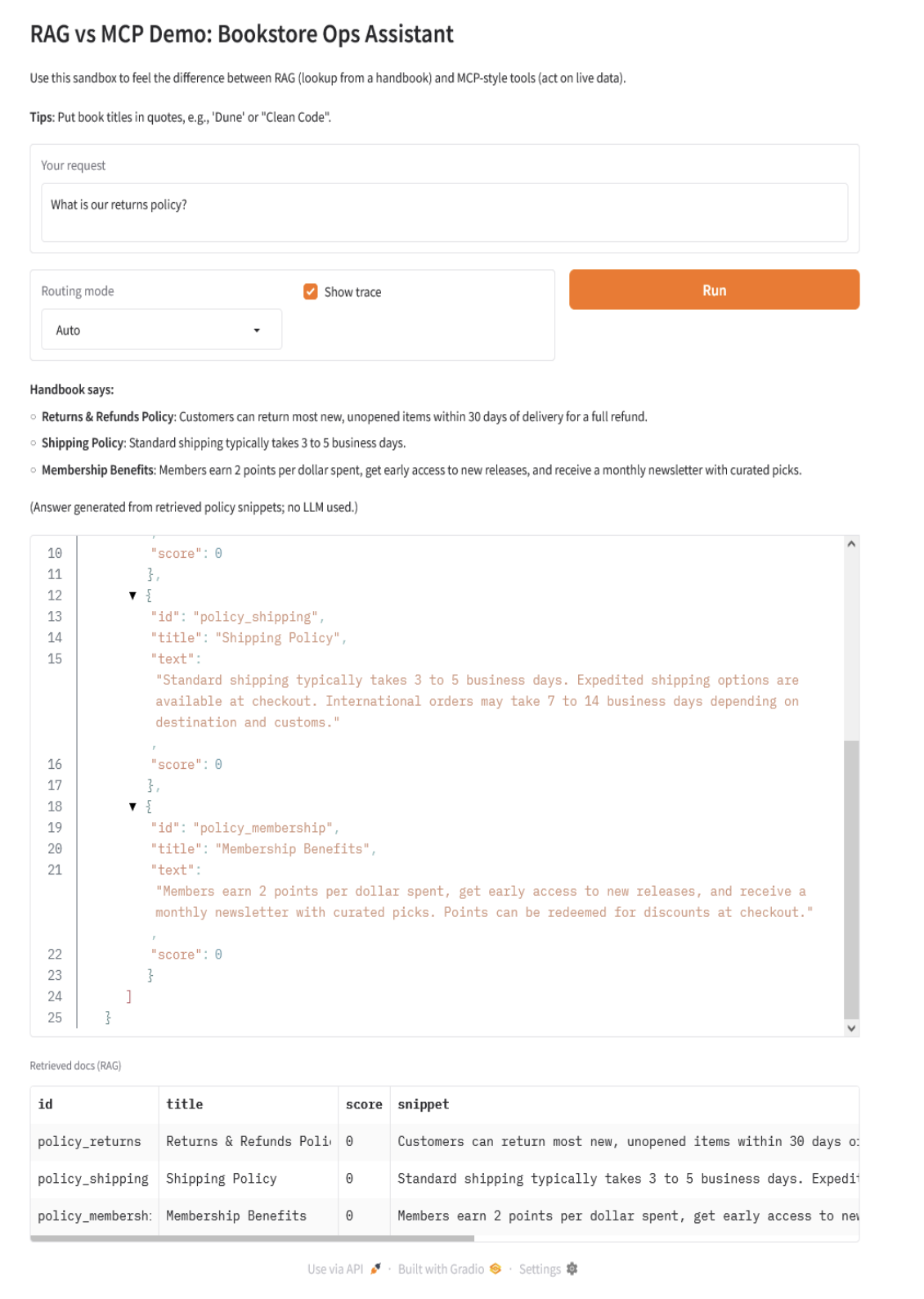
你可以尝试以下查询:
- “我们的退货政策是什么?”
- “标准运输需要多长时间?”
- “我们有库存‘沙丘’吗?”
- “订购 3 本‘程序员修炼之道’”
- “将‘代码整洁之道’的价格改为 29.99”
- “我们有库存‘沙丘’吗,退货政策是什么?”
这些示例将展示 RAG 处理静态 FAQ 式信息以及工具操作实时数据。在实际应用中,许多现代 AI 系统都是混合的。例如,客户支持聊天机器人可以通过 API 调用获取账户数据,同时还可以参考知识库中存储的产品文档。
常见问题解答
1. 我应该何时使用 RAG 而非 MCP?
当需要回答的问题的答案已存在于文档化的知识库中(无论是政策、规范、手册还是常见问题解答)时,应使用 RAG。RAG 方法最适合需要基于事实的响应或实时更新不是关键的场景。
2. 何时选择 MCP 更好?
如果需要使用或处理实时数据,应选择 MCP。如果查询依赖于 API、数据库,或者模型必须执行某个动作(创建工单、发送邮件等),也可以选择 MCP。
3. 每种方法的主要风险是什么?
- RAG 风险: 文档过时或缺失、因分块/同义词不匹配导致检索不佳,以及使用不相关分块使模型上下文过载。
- MCP 风险: 工具定义不佳(未知的 schema 或工具名称)、模型陷入循环或误用工具,以及如果工具允许意外操作可能带来的安全隐患。
4. 我可以将 RAG 和 MCP 结合在一个工作流中吗?
是的。事实上,许多实际案例都需要两者结合。例如,助手可能首先通过 RAG 获取保修政策,然后通过 MCP 下订单更换设备,最后通过引用相关政策来确认操作。RAG → MCP → RAG 这种流程在生产系统中非常常见。
5. 对于新查询,我如何快速决定使用 RAG 还是 MCP?
一个简单的规则是:
- 如果人类会“在文档中查找”,则使用 RAG。
- 如果人类会“点击按钮或查询数据库”,则使用 MCP。
总结
RAG 可以理解为你获取已知信息的方式,而 MCP 则代表你执行操作(并访问实时数据)的方式。在实践中,当答案已存在于文档中且需要引用时,通常会从 RAG 入手。当任务涉及 API、数据库或任何类型的工作流时,则应考虑使用 MCP。一旦两者都经过良好架构,就可以将它们结合起来,创建端到端的工作流(RAG → MCP → RAG),既能解释决策,又能采取行动。
如果你确实需要一个开箱即用的 MCP 服务器来管理你的基础设施,DigitalOcean 提供了一个开源的 MCP 服务器,它可以与 MCP 兼容的客户端(如 Claude Desktop/Code、Cursor 等)进行接口交互。你只需提供一个 DigitalOcean API token,注册服务器,然后像“部署这个仓库到 App Platform”或“显示服务 X 的日志”这样的自然语言提示就可以转换为 API 调用。这是一种连接你堆栈中“行动”部分的便捷方式,无需编写自己的胶水代码。
参考资料
- Model Context Protocol (MCP): A Developer’s Guide to Long-Context LLM Integration
- Integrating Agentic RAG with MCP Servers: Technical Implementation Guide
- RAG-MCP: Mitigating Prompt Bloat in LLM Tool Selection via Retrieval-Augmented Generation
关于
关注我获取更多资讯