GitHub Models 将 AI 功能引入到你的 GitHub Actions 工作流中,帮助你直接在项目所在地实现问题分类(triage)、内容总结等自动化任务。
本文将通过三个从简到繁的示例,探讨如何将 GitHub Models 集成并应用在 GitHub Actions 工作流中。
准备工作:配置正确的权限
在使用 GitHub Models 之前,你需要为你的 Actions workflow 授予访问 AI 模型的权限。如果没有正确的权限配置,任何调用 AI 模型的步骤都会失败。
为工作流授予 GitHub Models 的使用权限非常简单,只需在 permissions 块中添加一行配置:
permissions:
  contents: read
  issues: write
  models: read
这些权限将赋予你的 workflow 读取仓库内容、读写 issue 和评论的能力,以及最重要的——访问 GitHub Models 的权限。
安全提示
在我们开始示例之前,请注意潜在的提示注入(prompt injection)攻击风险以及如何规避。
最佳实践是仅为 GitHub Actions workflow 授予完成任务所需的最小权限。例如,如果你的 workflow 只需要读取 issue 内容,就不要将
issues权限设置为write。这能最大限度地减少恶意行为者通过创建 issue 来指示模型执行非预期操作的风险。
示例一:为 Bug 报告自动请求更多信息
这个示例将展示如何使用 AI 推理 action (AI inference action) 并利用 AI 创建分支逻辑。你可以在这个仓库中找到完整的 workflow 文件。
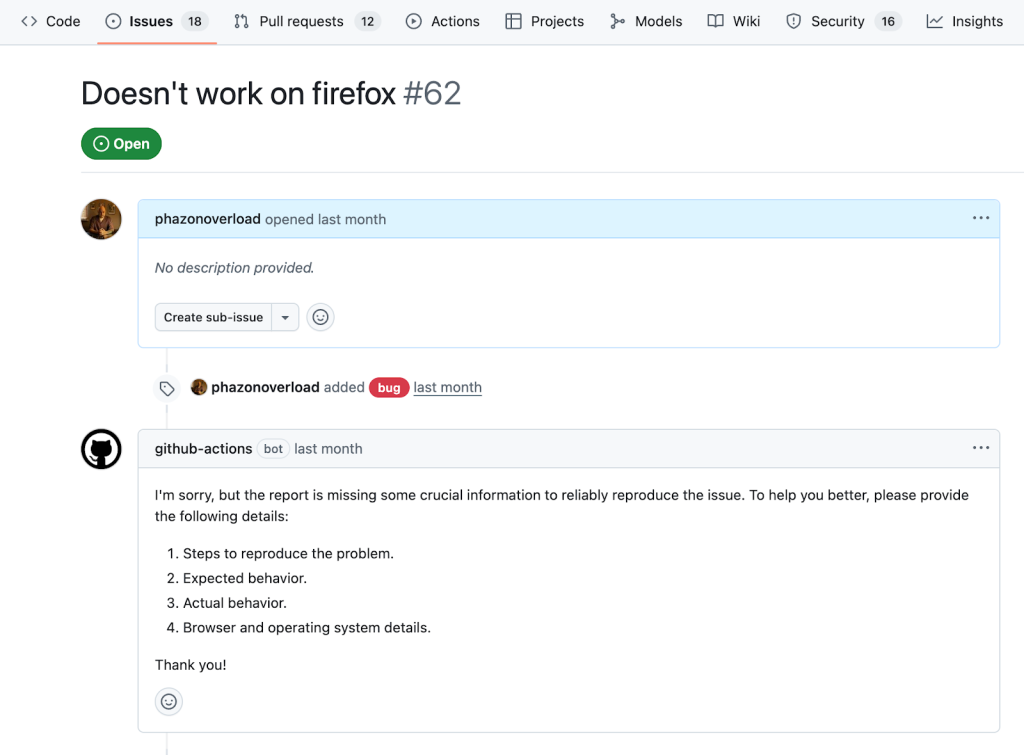
作为开发者,我们工作中耗时且繁琐的一部分就是对新提交的 issue 进行分类,而这些 issue 往往信息不足,难以复现问题。现在,你可以利用 AI 来自动化评估和响应这些 issue。下面的 workflow 会自动检查新的 bug 报告是否包含足够的可操作信息,如果信息不足则自动回复。
首先,在仓库的 .github/workflows 目录下创建一个名为 bug-reproduction-instructions.yml 的文件。该 workflow 会在有新 issue 创建时触发,并获取 issue 的标题和正文以供后续步骤使用。
name: Bug Report Reproduction Check

on:
  issues:
    types: [opened]

permissions:
  contents: read
  issues: write
  models: read

jobs:
  reproduction-steps-check:
    runs-on: ubuntu-latest
    steps:
      - name: Fetch Issue
        id: issue
        uses: actions/github-script@v7
        with:
          script: |
            const issue = await github.rest.issues.get({
              owner: context.repo.owner,
              repo: context.repo.repo,
              issue_number: context.issue.number
            })
            core.setOutput('title', issue.data.title)
            core.setOutput('body', issue.data.body)
接下来,创建一个新步骤,该步骤仅在 issue 带有 bug 标签时执行。此步骤将使用 AI inference action,配置一个 system prompt 来描述有效复现步骤的特征,并将 issue 的内容作为输入提供给模型。
      - name: Analyze Issue For Reproduction
        if: contains(join(github.event.issue.labels.*.name, ','), 'bug')
        id: analyze-issue
        uses: actions/ai-inference@v1
        with:
          model: mistral-ai/mistral-7b-instruct
          system-prompt: |
            Given a bug report title and text for an application, return 'pass' if there is enough information to reliably reproduce the issue, meaning the report clearly describes the steps to reproduce the problem, specifies the expected and actual behavior, and includes environment details such as browser and operating system; if any of these elements are missing or unclear, return a brief description of what is missing in a friendly response to the author instead of 'pass'. Consider the following title and body:
          prompt: |
            Title: ${{ steps.issue.outputs.title }}
            Body: ${{ steps.issue.outputs.body }}
此步骤的输出结果有两种可能:如果信息充足,它将返回 pass;否则,它将返回一段描述缺失信息的回复。你可以从 GitHub Models 市场中选择超过 40 种 AI 模型,只需将 model 的值替换为模型页面上的标识符即可。
最后,添加最后一个步骤,它仅在模型返回的值不是 pass 时,才会在 issue 下发表评论。
      - name: Comment On Issue
        if: contains(join(github.event.issue.labels.*.name, ','), 'bug') && steps.analyze-issue.outputs.response != 'pass'
        uses: actions/github-script@v7
        env:
          AI_RESPONSE: ${{ steps.analyze-issue.outputs.response }}
        with:
          script: |
            await github.rest.issues.createComment({
              owner: context.repo.owner,
              repo: context.repo.repo,
              issue_number: context.issue.number,
              body: process.env.AI_RESPONSE
            })
通过引导 AI 模型在满足特定条件时返回一个固定字符串(如此例中的 pass),我们可以在 workflow 中创建由 AI 驱动的条件逻辑。
示例二:根据合并的 PR 自动创建发布说明
这个示例将演示如何结合使用 gh CLI 和 gh-models 扩展。你可以在这个仓库中找到完整的 workflow 文件。
为项目新版本生成详尽的发布说明(release notes)是一项耗时的工作,需要整理变更内容并以简洁的方式向用户解释。
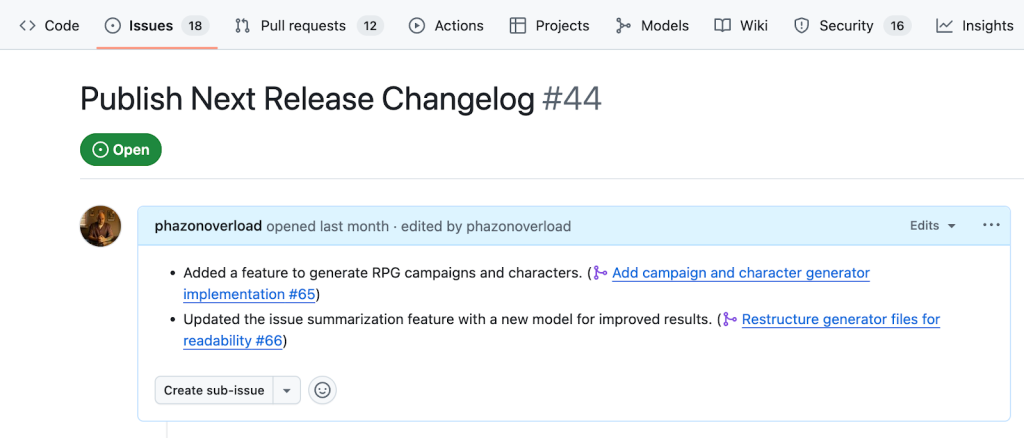
现在,你可以在 pull request (PR) 合并时触发 GitHub Actions workflow,使用 GitHub CLI 收集信息并执行操作,包括调用模型。下面的 workflow 将自动总结已合并的 PR,并将其添加到一个用于发布说明的 issue 中,从而节省每次 PR 合并后的时间和精力。
首先,创建一个名为 release 的新标签,并用这个标签创建一个 issue,标题为 Publish next release changelog。然后,在 .github/workflows 目录下创建 release-notes.yml 文件。该 workflow 会在 PR 关闭时触发,并且仅在其合并状态为 true 时运行。
name: Add to Changelog

on:
  pull_request:
    types:
      - closed

permissions:
  pull-requests: read
  issues: write
  contents: read
  models: read

jobs:
  add_to_changelog:
    if: github.event.pull_request.merged == true
    runs-on: ubuntu-latest
    steps:
      - name: Checkout repository
        uses: actions/checkout@v4
接下来,通过一个新步骤安装 gh-models 扩展,并提供你的 workflow token,该 token 已具备使用 GitHub Models 的权限。
      - name: Install gh-models extension
        run: gh extension install https://github.com/github/gh-models
        env:
          GH_TOKEN: ${{ secrets.GITHUB_TOKEN }}
剩下的步骤将在一个步骤中完成:
      - name: Summarize pull request and append to release issue
        env:
          GH_TOKEN: ${{ secrets.GITHUB_TOKEN }}
        run: |
          PR_NUMBER="${{ github.event.pull_request.number }}"

          # 获取 PR 信息并保存到文件
          gh pr view "$PR_NUMBER" --json title,body,comments,reviews > pr.json

          # 使用模型生成总结
          cat pr.json | gh models run xai/grok-1.5-mini \
            "Given the following pull request information, generate a single, clear, and concise one-line changelog entry that summarizes the main change (feature, fix, or bug) introduced by this PR. Use neutral, user-facing language and avoid technical jargon or internal references. Only write the line, with no additional introduction or explanation text." > summary.md

          # 获取发布 issue 的编号
          RELEASE_ISSUE=$(gh issue list --label release --limit 1 --json number --jq '.[0].number')

          # 获取当前发布 issue 的正文
          RELEASE_ISSUE_BODY=$(gh issue view "$RELEASE_ISSUE" --json body --jq '.body')

          # 将总结追加到发布 issue 的正文
          FORMATTED_LINE="- $(cat summary.md) (#$PR_NUMBER)"
          NEW_BODY="${RELEASE_ISSUE_BODY}"$'\n'"$FORMATTED_LINE"

          # 更新发布 issue
          gh issue edit "$RELEASE_ISSUE" --body "$NEW_BODY"
这个步骤首先获取 PR 的标题、正文、评论和审查信息,然后通过 gh models run 命令传递给模型。最后,它获取发布说明 issue 并用生成的总结行更新其内容。
示例三:每周自动汇总和排定 Issue 优先级
这个示例演示了如何使用 GitHub CLI、gh-models 扩展以及一个 prompt 文件来自动化一个更复杂的定时工作流。你可以查看完整的 workflow 文件和 prompt 文件。
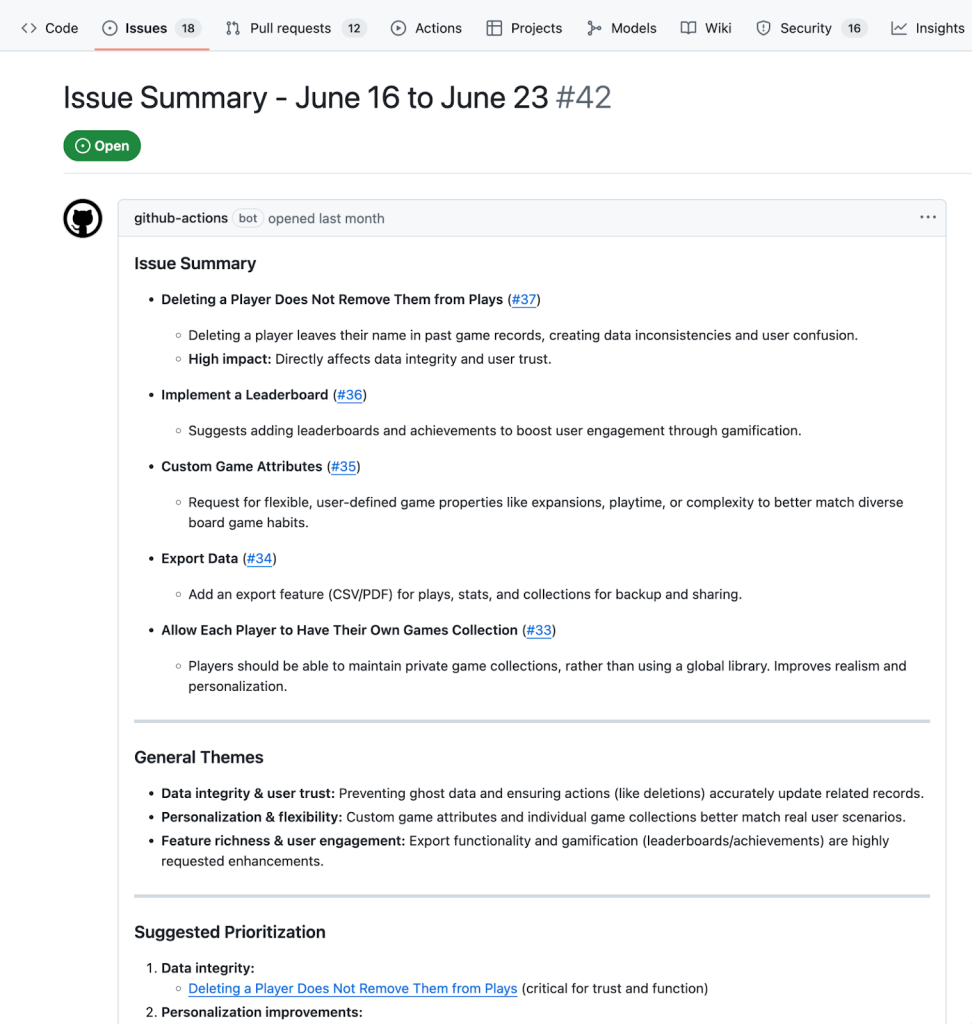
随着项目的发展,追踪所有新的活动变得越来越困难。为了解决这个问题,你可以设置一个定时的 GitHub Actions,每周自动创建一个 issue 来总结、归类和排定新开 issue 的优先级。
首先,在 .github/workflows 目录下创建 weekly-issue-summary.yml 文件。该 workflow 将在每周一上午 9 点触发。
name: Weekly Issue Summary

on:
  workflow_dispatch:
  schedule:
    - cron: '0 9 * * 1'

permissions:
  issues: write
  contents: read
  models: read

jobs:
  create_weekly_summary:
    runs-on: ubuntu-latest
    steps:
      - name: Checkout repository
        uses: actions/checkout@v4

      - name: Install gh-models extension
        run: gh extension install https://github.com/github/gh-models
        env:
          GH_TOKEN: ${{ github.token }}
创建一个新步骤来获取过去一周的 open issue 并将它们保存到文件中:
      - name: Get issues from the past week and summarize
        id: get_issues
        run: |
          LAST_WEEK=$(date -d "7 days ago" +"%Y-%m-%d")
          gh search issues "created:>$LAST_WEEK" --state=open --json title,body,url --repo ${{ github.repository }} > issues.json

          # 下一步的命令将在这里继续
        env:
          GH_TOKEN: ${{ github.token }}
将收集到的一周的 issue 传递给 gh models run 命令:
cat issues.json | gh models run --file prompts/issue-summary.prompt.yml > summary.md
与前一个示例不同,这里我们使用了一个独立的 prompt 文件。在你的仓库中创建一个 prompts 目录,并在其中创建一个 issue-summary.prompt.yml 文件:
name: Issue summarizer
description: Summarizes weekly issues
model: openai/gpt-4o
messages:
  - role: system
    content: You are a helpful issue summarizer. When given issue content, respond in markdown format.
  - role: user
    content: "Please summarize the following issues into a few short bullet points. Include links if provided. If possible, pull out general themes and help the team prioritize based on impact. Issues begin here:\n {{input}}"
这个文件包含了所有必要的信息:模型、系统和用户 prompt,以及用于调整响应的可选参数。使用 .prompt.yml 文件,你还可以利用 GitHub Models 的仓库集成功能,通过一个富 UI 界面来迭代和优化 prompt。
回到 workflow 文件,在 gh models run 命令之后,用生成的总结创建一个新的 issue:
          ISSUE_TITLE="Issue Summary - $(date -d '7 days ago' '+%B %d') to $(date '+%B %d')"
          gh issue create --title "$ISSUE_TITLE" --label summary --body-file summary.md
总结
无论你是从简单的 AI inference action 开始,还是使用带有内联 prompt 的 gh-models CLI,亦或是创建功能齐全、由 prompt 文件驱动的 workflow,GitHub Models 都能让你轻松地利用 AI 扩展你的流程。
只需配置好权限,选择一个上面的示例,就可以在你下一个 workflow 中尝试 GitHub Models 的强大功能了。
关于
关注我获取更多资讯